Integration between the Semantic Integration Engine and VSCode
The Semantic Integration Engine (SIE) (SIE) integrates the SimpleModeling Body of Knowledge (BoK) as RDF, vector databases, and knowledge graphs,with the goal of enabling AI and tools to use this knowledge “while preserving its meaning.”
In previous articles, we introduced how to use SIE via REST APIs and ChatGPT (MCP (Model Context Protocol) / WebSocket).Building on that flow, this article focuses on using SIE from VSCode, the core of the local development environment,and explains the integration architecture and a demo using MCP (Model Context Protocol).
VSCode integration is an important step toward naturally embedding knowledge graphs and domain knowledgeinto everyday development activities such as code editing, design, and investigation.
Flow So Far
So far, we have explained the following approaches as clients for using the Semantic Integration Engine.
REST is an interface for exposing functionality to general-purpose applications.
For ChatGPT, we provided a WebSocket interface that ChatGPT uses.
Unlike general MCP clients, ChatGPT connects using its own protocol derived from JSON-RPC, so a dedicated interface is required.
VSCode
REST serves as an interface for exposing functionality to general-purpose applications.
For ChatGPT, we provided a WebSocket interface that ChatGPT itself uses.
Unlike general MCP clients, ChatGPT connects using its own protocol derived from JSON-RPC, which is why a dedicated interface is required.
VSCode MCP Specification
VSCodeのMCP仕様は以下の仮定で行いました。
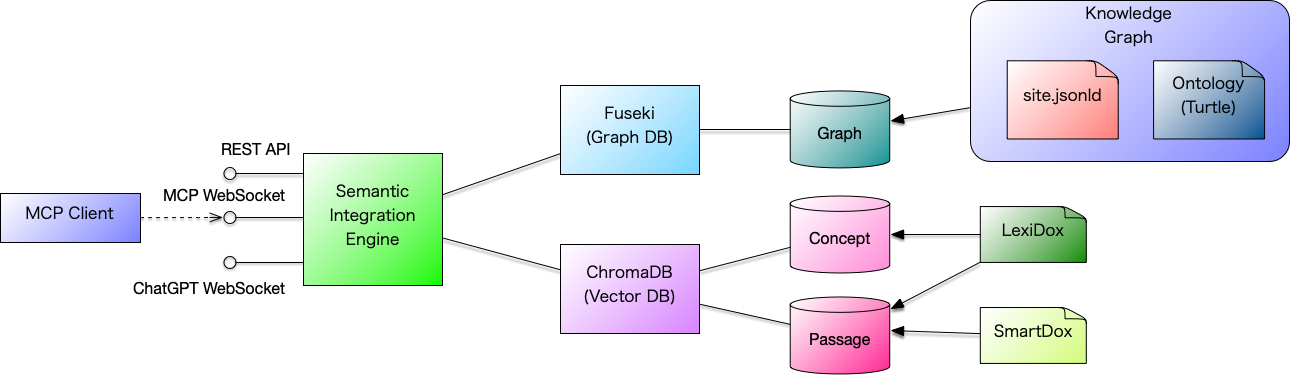
Architecture
VSCode communicates with the RAG server via standard input/output to a command launched locally.
SIE exposes the following three interfaces.
-
REST
-
MCP(JSON-RPC)
-
ChatGPT
For the MCP communication endpoint based on JSON-RPC, the McpClient command acts as an intermediary in the overall architecture.
Startup
Docker Compose is used to start the demo environment.
Copy the following docker-compose.yml , create a working directory, and save it there as docker-compose.yml .
services:
  #######################################################################
  # FUSEKI — RDF / SPARQL server
  #######################################################################
  fuseki:
    image: ghcr.io/asami/preload-fuseki:latest
    container_name: sie-fuseki
    platform: linux/amd64
    ports:
      - "9030:3030"
    restart: unless-stopped
    networks:
      - sie-net
    healthcheck:
      test: ["CMD", "curl", "-f", "http://localhost:3030/ds/query?query=SELECT%20*%20WHERE%20%7B%20?s%20?p%20?o%20%7D%20LIMIT%201"]
      interval: 5s
      timeout: 3s
      retries: 20
      start_period: 10s
  #######################################################################
  # SIE-EMBEDDING — Lightweight embedding service
  #######################################################################
  sie-embedding:
    image: ghcr.io/asami/sie-embedding:latest
    container_name: sie-embedding
    ports:
      - "8081:8081"
    restart: unless-stopped
    networks:
      - sie-net
    healthcheck:
      test: ["CMD", "curl", "-f", "http://localhost:8081/health"]
      interval: 3s
      timeout: 2s
      retries: 20
  #######################################################################
  # SIE — Semantic Integration Engine (Demo)
  #
  # NOTE:
  # - This demo explicitly uses application.demo.conf.
  # - Do NOT rely on the image default ENTRYPOINT/CMD for demo behavior.
  # - This preserves the historical demo behavior from docker-compose.demo.yml.
  #######################################################################
  sie:
    image: ghcr.io/asami/sie:0.1.0
    container_name: sie
    volumes:
      - .:/workspace/vscode-mcp
    depends_on:
      fuseki:
        condition: service_healthy
      sie-embedding:
        condition: service_healthy
    ports:
      - "9050:9050"   # HTTP + MCP WebSocket API (/mcp)
    environment:
      SIE_MODE: demo
      # ---- Application server mode (required) ----
      SERVER_MODE: demo
      # ---- MCP / VS Code workspace ----
      SIE_WORKSPACE_DIR: /workspace/vscode-mcp
      # ---- SIE configuration ----
      FUSEKI_URL: http://sie-fuseki:3030/ds
      SIE_EMBEDDING_MODE: "oss"
      SIE_EMBEDDING_ENDPOINT: http://sie-embedding:8081/embed
    command:
      - java
      - -Dconfig.file=/app/conf/application.demo.conf
      - -jar
      - /app/semantic-integration-engine.jar
    restart: unless-stopped
    networks:
      - sie-net
  #######################################################################
  # SIE-MCP — MCP stdio client (transient, non-daemon)
  #######################################################################
  sie-mcp:
    image: ghcr.io/asami/sie:0.1.0
    container_name: sie-mcp
    entrypoint: ["/opt/sie/bin/mcp-client"]
    stdin_open: true
    tty: false
    depends_on:
      sie:
        condition: service_started
    environment:
      MCP_WS_URL: ws://sie:9050/mcp
    networks:
      - sie-net
networks:
  sie-net:
Startup
Move to the working directory and start the demo using the Docker command as shown below.
$ docker compose up -dStartup is complete once the following output is displayed.
[+] Running 5/5
 ✔ Network workd_sie-net    Created                                        0.0s
 ✔ Container sie-fuseki     Healthy                                        6.2s
 ✔ Container sie-embedding  Healthy                                       22.2s
 ✔ Container sie            Started                                       21.8s
 ✔ Container sie-mcp        Started                                       21.8s
Note that even after SIE has finished starting up, a background process continues to register HTML documents into the vector database, so it is advisable to wait a few minutes before running the demo.
Operational Environment
When SIE is started, the following files are created in the working directory.
The .sie-workspace-initialized file is a lock file used to avoid redundant initialization and can be safely ignored.
The .vscoe/settings.json file is the MCP definition file for VSCode and contains the following content.
{
  "mcp.servers": {
    "sie": {
      "command": "./bin/sie-mcp"
    }
  }
}VSCode
Because the VSCode configuration did not work as expected, we asked the following question to VSCode Codex.
`console Is the configuration in ` .vscode/settings.json ` correct? ` The response is as follows.
`` `console At a quick glance, the configuration itself looks correct. The main points to check are as follows:
Whether ./bin/sie-mcp actually exists (/private/tmp/work.d/bin/sie-mcp) Whether it has execution permissions (chmod +x has been applied) Whether VS Code’s working directory is set to work.d (since the path is relative) If needed, I can run commands to check for existence and execution permissions. ` `` Although we were told that the configuration itself was correct, we were unable to use SIE from VSCode with this setup. Additional configuration may be required, but for now we proceed using a pseudo session.
Operation Verification
Since we were unable to use SIE MCP from VSCode, we will manually establish an MCP connection via standard input/output and continue the explanation using a pseudo session.
Manually start the bin/sie-mcp command as shown below. By piping the output to the jq command, you can format and display the received JSON.
$ bin/sie-mcp | jqWhen the sie-mcp command is started, it enters a state where it waits for input from standard input.
initialize
Initialization is performed using initialize .
{ "jsonrpc": "2.0", "id": "1", "method": "initialize"}In the case of ChatGPT, we sent the following request, but you can see that the format differs slightly. While VSCode uses a JSON-RPC–based MCP, ChatGPT also uses WebSocket, but the actual message format is not JSON-RPC compliant and instead uses a proprietary JSON structure.
{"type":"initialize","protocolVersion":"1.0","client":{"name":"chatgpt","version":"1.0"}}The following JSON is returned as a result of initialization via initialize .
{
  "jsonrpc": "2.0",
  "id": "1",
  "result": {
    "capabilities": {}
  }
}
get_manifest
The get_manifest call returns a list of the capabilities provided by MCP.
There was also an assumption that VSCode might use only initialize and not call get_manifest , but in this demo we adopted a flow that uses both initialize and get_manifest .
{ "jsonrpc": "2.0", "id": "1", "method": "get_manifest"}As a result of get_manifest , information about the following two tools was returned in tools .
-
query: Query the database.
-
explainConcept: Explain a concept.
{
  "jsonrpc": "2.0",
  "id": "1",
  "result": {
    "tools": [
      {
        "name": "query",
        "description": "Semantic query using existing query implementation",
        "input_schema": {
          "type": "object",
          "required": [
            "query"
          ]
        }
      },
      {
        "name": "explainConcept",
        "description": "Explain a concept using the SimpleModeling knowledge base",
        "input_schema": {
          "type": "object",
          "required": [
            "name"
          ]
        }
      }
    ]
  }
}
query
Next, we execute the query tool.
{ "jsonrpc": "2.0", "id": "1", "method": "tools/call", "params": { "name": "query", "arguments": { "query": "SimpleObject" } }}As a result of the request, the following information related to the queried term is returned.
-
concepts: A list of related concepts.
-
passages: A list of related articles with descriptive text.
-
graph: The knowledge graph.
The graph (knowledge graph) contains a list of nodes that make up the knowledge graph in nodes, and a list of knowledge triples in edges.
{
  "jsonrpc": "2.0",
  "id": "1",
  "result": {
    "concepts": [
      {
        "uri": "https://www.simplemodeling.org/glossary/domain-modeling/simpleobject",
        "label": "SimpleObject",
        "lang": "en"
      }
    ],
    "passages": [
      {
        "id": "https://www.simplemodeling.org/en/glossary/domain-modeling/simpleobject.html#chunk-0",
        "text": "SimpleObject ASAMI, Tomoharu Term SimpleObject Aliases - Definition SimpleObject is an abstract object defined in the SimpleModeling Reference Profile that specifies common attributes for domain objects. It delegates generic attribute groups—such as NameAttributes and LifecycleAttributes—as value objects, making it reusable as a base class for both entity objects and value objects. SimpleEntity inherits from SimpleObject and adds attributes such as the identifier (id) required for persistence, forming the foundation of entity objects. Category Domain Modeling SimpleModeling Reference Profile Related Terms SimpleEntity Value Object Domain Object Attribute Group Related Articles SimpleObject",
        "score": 0.7675370573997498
      },
      {
        "id": "https://www.simplemodeling.org/en/glossary/domain-modeling/simpleentity.html#chunk-0",
        "text": "SimpleEntity ASAMI, Tomoharu Term SimpleEntity Aliases - Definition SimpleObject is an abstract object defined in the SimpleModeling Reference Profile that specifies common attributes for domain objects. SimpleEntity provides a comprehensive set of attributes commonly needed by entity objects, allowing designers to define entity objects by simply adding domain-specific attributes. Category Domain Modeling SimpleModeling Reference Profile Related Terms SimpleObject Value Object Domain Object Attribute Group Related Articles SimpleObject",
        "score": 0.7702887058258057
      },
      {
        "id": "https://www.simplemodeling.org/en/domain-modeling/simple-object.html#chunk-0",
        "text": "SimpleObject ASAMI, Tomoharu Created: 2025-09-15 Updated: 2025-12-15 In the SimpleModeling Reference Profile (SMRP), the abstract class SimpleEntity is defined as the base class for all entity objects. Except for special cases, all entity objects are expected to derive from SimpleEntity. SimpleEntity provides a comprehensive set of attributes commonly needed by entity objects, allowing designers to define entity objects by simply adding domain-specific attributes. SimpleObject is defined as the base class of SimpleEntity. SimpleObject is an abstract object in SimpleModeling that defines the common attributes of domain objects. Value objects can optionally use SimpleObject as their base class. SimpleObject is composed by delegating various generic attribute groups, each of which can also be",
        "score": 0.7750577330589294
      },
      {
        "id": "https://www.simplemodeling.org/en/blog/sm-mcp-chatgpt.html#chunk-19",
        "text": "  },\n      {\n        \"id\": \"https://www.simplemodeling.org/en/domain-modeling/simple-object.html#chunk-0\",\n        \"text\": \"SimpleObject ASAMI, Tomoharu Created: 2025-09-15 In the SimpleModeling Reference Profile, the abstract class SimpleEntity is defined as the base class for all entity objects. Except for special cases, all entity objects are expected to derive from SimpleEntity. SimpleEntity provides a comprehensive set of attributes commonly needed by entity objects, allowing designers to define entity objects by simply adding domain-specific attributes. SimpleObject is defined as the base class of SimpleEntity. SimpleObject is an abstract object in SimpleModeling that defines the common attributes of domain objects. Value objects can optionally use SimpleObject as their base class. S",
        "score": 0.8564751744270325
      },
      {
        "id": "https://www.simplemodeling.org/en/domain-modeling/simple-object.html#chunk-3",
        "text": "defines an id attribute required for persistence, which makes it unsuitable for non-persistent objects like value objects. To accommodate use with value objects, a separate class named SimpleObject was defined to hold only common attributes, and SimpleEntity was made a subclass of SimpleObject. Internationalization In this article, the file simpleobject.cml is prepared in both Japanese and English versions, but in actual operation, it is also possible to include both Japanese and English descriptions side by side as shown below. Tools can extract and utilize the respective Japanese and English descriptions as needed. References Glossary SimpleEntity SimpleObject is an abstract object defined in the SimpleModeling Reference Profile that specifies common attributes for domain objects. Simple",
        "score": 0.8827045559883118
      }
    ],
    "graph": {
      "nodes": [
        {
          "id": "https://www.simplemodeling.org/glossary/domain-modeling/simpleobject",
          "label": "SimpleObject",
          "kind": "concept"
        },
        {
          "id": "https://www.simplemodeling.org/en/glossary/domain-modeling/simpleobject.html#chunk-0",
          "label": "SimpleObject ASAMI, Tomoharu Term SimpleObject Aliases - Definition SimpleObject",
          "kind": "passage"
        },
        {
          "id": "https://www.simplemodeling.org/en/glossary/domain-modeling/simpleentity.html#chunk-0",
          "label": "SimpleEntity ASAMI, Tomoharu Term SimpleEntity Aliases - Definition SimpleObject",
          "kind": "passage"
        },
        {
          "id": "https://www.simplemodeling.org/en/domain-modeling/simple-object.html#chunk-0",
          "label": "SimpleObject ASAMI, Tomoharu Created: 2025-09-15 Updated: 2025-12-15 In the Simp",
          "kind": "passage"
        },
        {
          "id": "https://www.simplemodeling.org/en/blog/sm-mcp-chatgpt.html#chunk-19",
          "label": "  },\n      {\n        \"id\": \"https://www.simplemodeling.org/en/domain-modeling/si",
          "kind": "passage"
        },
        {
          "id": "https://www.simplemodeling.org/en/domain-modeling/simple-object.html#chunk-3",
          "label": "defines an id attribute required for persistence, which makes it unsuitable for ",
          "kind": "passage"
        }
      ],
      "edges": [
        {
          "source": "https://www.simplemodeling.org/glossary/domain-modeling/simpleobject",
          "target": "https://www.simplemodeling.org/en/glossary/domain-modeling/simpleobject.html#chunk-0",
          "relation": "related"
        },
        {
          "source": "https://www.simplemodeling.org/glossary/domain-modeling/simpleobject",
          "target": "https://www.simplemodeling.org/en/glossary/domain-modeling/simpleentity.html#chunk-0",
          "relation": "related"
        },
        {
          "source": "https://www.simplemodeling.org/glossary/domain-modeling/simpleobject",
          "target": "https://www.simplemodeling.org/en/domain-modeling/simple-object.html#chunk-0",
          "relation": "related"
        },
        {
          "source": "https://www.simplemodeling.org/glossary/domain-modeling/simpleobject",
          "target": "https://www.simplemodeling.org/en/blog/sm-mcp-chatgpt.html#chunk-19",
          "relation": "related"
        },
        {
          "source": "https://www.simplemodeling.org/glossary/domain-modeling/simpleobject",
          "target": "https://www.simplemodeling.org/en/domain-modeling/simple-object.html#chunk-3",
          "relation": "related"
        }
      ]
    }
  }
}
Summary
In this article, we explained the configuration for using the Semantic Integration Engine from VSCode via MCP.
-
That the MCP for VSCode is a simple protocol based on standard input/output and JSON-RPC
-
That SIE has a polyhedral architecture with multiple interfaces: REST, ChatGPT, and MCP
-
That semantic operations such as
queryandexplainConceptare available via MCP -
That, at present, MCP registration in VSCode is not stable and verification was performed using a pseudo session
These points were confirmed through the demonstration.
Although integration with VSCode is still at an experimental stage, the direction of directly using knowledge graphs and RAG from the editor has important implications for future AI-assisted development.
The Semantic Integration Engine serves as a foundation for AI and developers to share the same knowledge context, and will continue to be improved and experimented with going forward.
References
Glossary
- RDF
-
A W3C-standardized data model that represents information as subject–predicate–object triples.
- Semantic Integration Engine (SIE)
-
Semantic Integration Engine|Semantic Integration Engine(意味統合エンジン) ============= status=published published_at=2025-12-08 tag=simplemodeling_unique
- BoK (Body of Knowledge)
-
At SimpleModeling, the core knowledge system for contextual sharing is called the BoK (Body of Knowledge). The goal of building a BoK is to enable knowledge sharing, education, AI support, automation, and decision-making assistance.
- SimpleModeling
-
SimpleModeling is a modeling-centered software development methodology and technology system for constructing a Domain Model from Knowledge, formalizing it in CML, realizing it as executable software through Cozy and AI, and running it on Textus.
- Model Context Protocol (MCP)
-
The Model Context Protocol (MCP) is an open protocol for connecting applications that use generative AI with external data sources and tools and for providing context and capabilities in a standardized form.
- Model
-
A Model is an abstraction that represents a subject according to a particular Purpose and Concern so that it can be understood, reasoned about, evaluated, or constructed. It is not the subject itself; it preserves the elements, relationships, and meanings required for its purpose.
- knowledge graph
-
A semantic graph-based knowledge base where nodes represent entities or concepts and edges represent their relationships.
- Communication
-
Undefined
- Retrieval-Augmented Generation (RAG)
-
A generation technique that supplements a language model’s internal (parametric) knowledge by retrieving relevant external information before generation. RAG systems first search knowledge sources such as databases or knowledge graphs and then use the retrieved context as input for text generation.
- State
-
In UML, a State models a situation during which an invariant condition holds. The current State of an Object may determine accepted Events and Operations, applicable Constraints, and possible next Transitions.
- Operation
-
In UML, an Operation is a Behavioral Feature of a Classifier that specifies the name, type, Parameters, and Constraints for invoking associated Behavior. The Operation specifies an invocation contract, while a Method or another Behavior realizes it.
- verification
-
Verification is the activity of confirming that an implementation conforms to its specified design or requirements.